
ERP data migration is moving the records your business runs on, such as customers, suppliers, items, open orders and balances, from old systems into a new ERP so it is correct on day one. A sound plan scopes what moves, cleanses and maps it, rehearses with at least two or three trial loads, and reconciles results with finance sign-off before cutover.
It is the part of migrating to a new ERP that most often delays go-live. The software can be configured perfectly and still fail if the opening stock is wrong or half the customer records have no VAT number. This checklist sets out the order we work in, who owns each step, and what has to be signed off before you move on.
What data should move to the new ERP?
Not everything. Scoping is the decision that saves the most effort later, so make it early and write it down.
Master data
Customers, suppliers, items and products, bills of materials, routings, price lists, chart of accounts, warehouses and locations, employees where relevant. Master data almost always moves, but only active records. A customer who last ordered in 2017 does not need to be in the new system.
Open transactions
Open sales orders, open purchase orders, unpaid invoices on both ledgers, stock on hand by location and batch, work in progress, open jobs. These move at cutover because the business needs them to keep trading on day one.
History: how much?
This is where projects get stuck. Teams want five years of transaction history "for reporting", but every year of history multiplies mapping, cleansing and reconciliation effort. Old transactions also rarely fit the new system's structure.
Our default advice: move opening balances plus open items, and one to two years of summarised history if reporting genuinely needs it. Keep the rest in a read-only archive that can be searched and reported on. Decide this per data type, not in one blanket rule.
Who owns the data during an ERP migration?
Every data object needs a named business owner as well as an IT contact. The credit controller owns customer data, the buyer owns suppliers, the production manager owns BOMs, the financial controller owns balances.
Owners decide the cleansing rules, review the mapped data, and sign off each trial load. IT and the implementation partner run the extracts and loads, but they cannot tell you whether a customer's payment terms are correct. If owners are not given time in their week for this, the migration will slip.
How should you profile and cleanse the data?
Profile before you cleanse. Profiling means running counts, completeness checks and pattern checks across each source table so you know what you are dealing with. Typical findings:
- Duplicate customers and suppliers under slightly different names.
- Items with no unit of measure, weight or cost.
- Free-text fields used for things that should be codes, such as delivery instructions holding account numbers.
- Addresses with postcodes in the wrong field.
- Negative stock, or stock in locations that no longer exist.
Then cleanse in the source system where you can, so fixes stick and the next extract is clean. Fix in the transformation layer only when the source cannot hold the correct value. Keep a cleansing log: what rule, who approved it, how many records changed.
Data cleansing is also the moment to apply UK GDPR's data minimisation principle. If personal data is no longer needed, do not carry it into the new system.
Mapping, transformation and reference data
Mapping documents each source field to its target field, with the rule that transforms it. Write the rules so a business owner can read them: "Customer status 'H' (on hold) maps to blocked = yes, reason = credit."
Reference data deserves its own workstream. Units of measure, VAT codes, payment terms, currency codes, cost centres, item groups and nominal codes must exist in the new ERP before anything that refers to them is loaded. Agree the new code lists first, then build cross-reference tables from old codes to new. Most failed loads we see trace back to a missing or mismatched code.
How many trial migrations should you run?
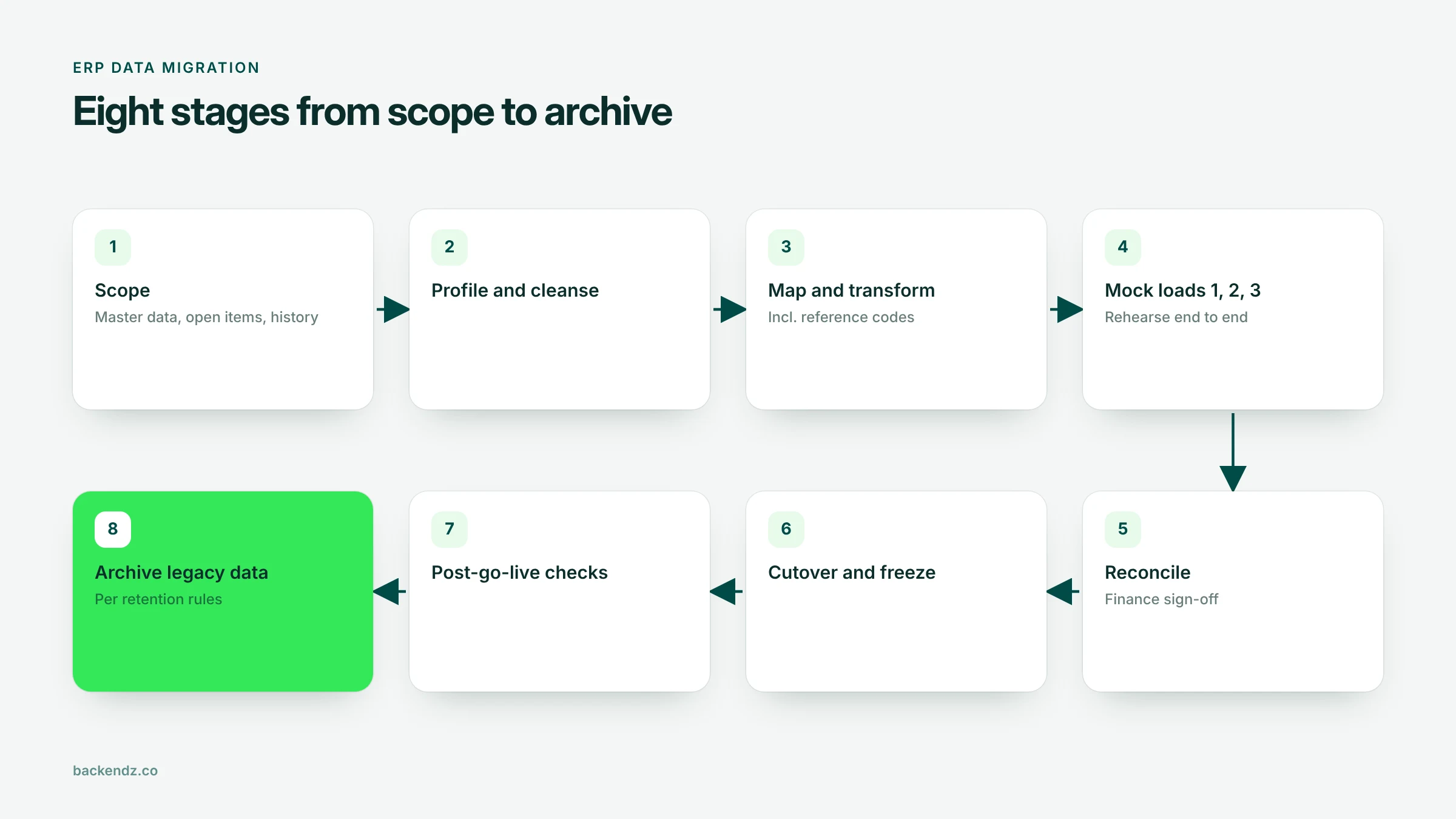
At least two, ideally three, full mock loads into a test copy of the new ERP before go-live.
- Mock 1 proves the extract, transform and load scripts run end to end. Expect many errors.
- Mock 2 uses cleansed data and the corrected mapping. Business owners review results and test real processes on the migrated data: raise an invoice, receive stock, run a payment.
- Mock 3 is a dress rehearsal of cutover, timed, using the cutover runbook, ideally on a recent extract. It tells you how long the real cutover will take.
Do not skip mocks to save time. Each one is cheaper than finding the problem after go-live.
How do you reconcile and sign off migrated data?
Reconciliation proves the data arrived complete and correct. It has three layers:
- Counts. Records extracted, records rejected, records loaded, per object. Every rejected record is explained.
- Balances. Trial balance, aged debtors, aged creditors, stock value by location, and open order values match between old and new systems at the cutover date.
- Samples. Owners check a sample of records field by field, including awkward ones: foreign currency customers, items with multiple units, part-paid invoices.
The financial controller or finance director signs off balances. Each data owner signs off their objects. Without written sign-off, there is no go-live.
The ERP data migration checklist
| Phase | Task | Owner | Sign-off |
|---|---|---|---|
| Scope | Agree data objects, active-record rules and history depth | Project lead + data owners | Steering group |
| Scope | Name a business owner for every data object | Project sponsor | Steering group |
| Prepare | Profile source data: counts, completeness, duplicates | Data analyst | Data owners |
| Prepare | Cleanse in source; keep a cleansing log | Data owners | Data owners |
| Design | Field mapping and transformation rules | Implementation partner | Data owners |
| Design | New reference code lists and cross-references | Finance + operations leads | Financial controller |
| Test | Mock load 1: technical run end to end | Implementation partner | Project lead |
| Test | Mock load 2: cleansed data, process testing | Data owners | Data owners |
| Test | Mock load 3: timed dress rehearsal | Project lead | Steering group |
| Reconcile | Counts, balances, sample checks per mock | Data owners + finance | Finance director |
| Cutover | Freeze window, final extract, load, reconcile | Project lead | Finance director + sponsor |
| Cutover | Rollback criteria and decision point agreed | Project lead | Sponsor |
| Live | Post-go-live checks for first two weeks | Data owners | Project lead |
| Close | Archive legacy data; apply retention schedule | IT + DPO or data lead | Finance director |
Cutover, freeze window and rollback
The cutover plan is an hour-by-hour runbook: when the old system stops taking transactions, when the final extract runs, the order of loads, reconciliation points, and the go or no-go decision.
Plan a freeze window. Typically, master data changes freeze a week or two before cutover, and transactions freeze for the cutover itself, often a weekend or month end. Anything that must happen during the freeze, such as an urgent dispatch, is logged manually and keyed in after go-live.
Rollback must be decided before you start, not invented on the night. Agree the criteria (for example, trial balance does not reconcile, or a critical object fails to load), the latest time a rollback decision can be made, and how the old system is reopened. If you cannot roll back after a certain point, say so clearly to the sponsor.
After go-live: checks, archiving and retention
For the first two weeks, run daily checks: stock movements, invoice postings, payment runs and the first month-end close. Expect small data issues. Have owners and a fix process ready.
Then archive the legacy system. Companies must generally keep accounting records for six years from the end of the financial year they relate to, and longer in some cases, so you need read-only access to old records even if they did not migrate. A searchable archive is usually cheaper than keeping the old ERP licensed.
For personal data, UK GDPR's storage limitation principle means you should not keep it longer than you need it. Apply your retention schedule to the archive, delete what has expired, and make sure test copies used for mock loads are removed or anonymised when the project ends.
If the new ERP also needs changes to fit your processes, scope them separately from the migration. We cover why those quotes vary so much in why ERP customisation quotes come back by the quarter.
Frequently asked questions
How long does an ERP data migration take?
For a UK SME or mid-market firm, data migration usually runs alongside the wider ERP project and takes several months from scoping to cutover. Most of the time goes into cleansing, mapping and the trial loads rather than the final load. The cutover itself is normally planned for a weekend or month end.
How much historical data should we migrate to a new ERP?
Usually less than people expect. Move opening balances, open transactions and, if reporting genuinely needs it, one to two years of summarised history. Keep older records in a searchable read-only archive to meet retention requirements without the cost of migrating them.
Who should sign off ERP data migration?
Each business data owner signs off their data objects, such as customers, suppliers and items. The financial controller or finance director signs off balances, including the trial balance, aged debtors, aged creditors and stock value. The project sponsor signs off the go or no-go decision at cutover.
What is the difference between data cleansing and data mapping?
Data cleansing fixes the data itself: removing duplicates, filling missing values and correcting errors, ideally in the source system. Data mapping defines where each source field goes in the new ERP and the rule that transforms it. Both are needed, and cleansing should start first because it reduces the number of mapping exceptions.
Does UK GDPR affect ERP data migration?
Yes. Migration is processing of personal data, so you should only carry across personal data you still need, apply your retention schedule to archived data, and protect the test copies used for trial loads. Customer, supplier contact and employee records are the usual areas to review.
Where to start
Write down which data objects you plan to move, who owns each one, and how much history you really need. That one page will shape the rest of the plan. If you would like a team that has run this process before to take it on, see our ERP data migration service, which works alongside your ERP implementation partner or ours.